Shopping Cart (0)
Close


No products in the cart.
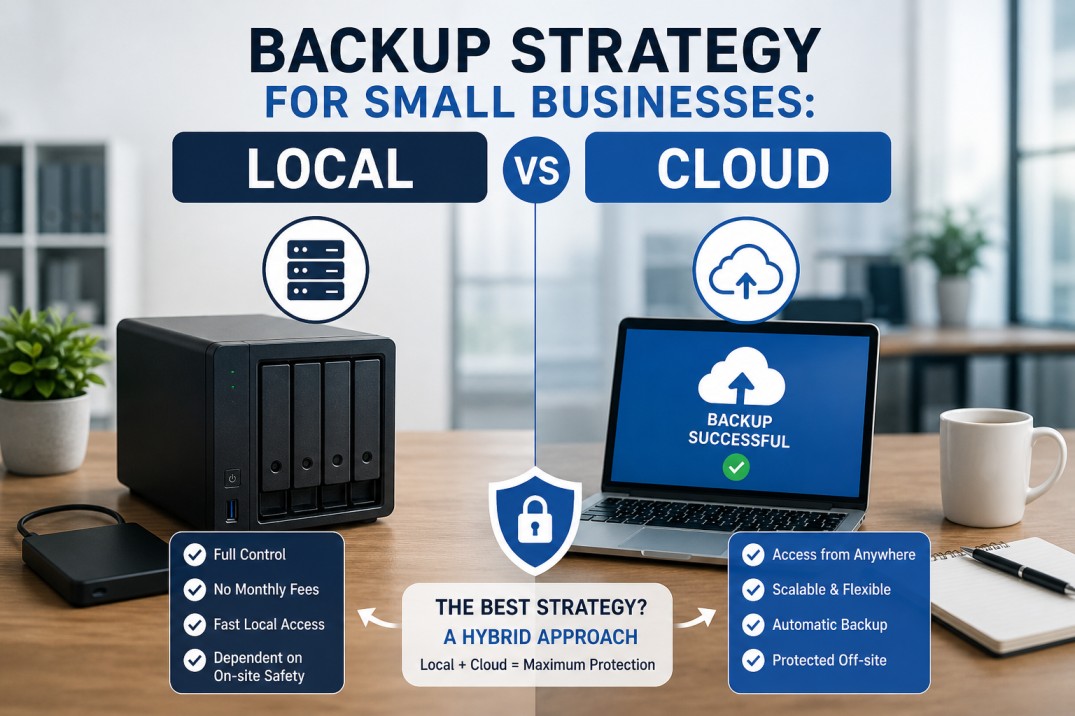
A proper backup strategy is a crucial component of an IT setup for any samll businesses. This approach will secure your information including all documents, personal data, invoices, project related materials, and operational files.
In case of the laptop breakdown, hard drive damage, or encryption by the ransomware, your backups may be your last hope in terms of avoiding serious consequences for your company.
CISA advises small businesses to follow a particular strategy which is called 3-2-1: i.e. have three copies of critical data, two different media of storage and at least one copy stored off site.
NIST also encourages SMBs to perform regular backups and protect their backups. The key concern of every small business in relation to the discussed matter is fairly straightforward: what type of backup should you implement: cloud, local or hybrid?
The answer depends on how your business works, how much data you handle, how quickly you need to restore files, and how much risk you are willing to accept. In many cases, the strongest answer is not local backup or cloud backup alone, but a well planned hybrid backup strategy.
Creating a backup does not simply mean moving files to other locations. It requires a strategy for safeguarding company information and recovering it in case of failure. This involves determining which information will be backed up, the frequency of the backups, their storage location, retention period, and the process of restoring them quickly.
Both NIST and CISA stress that a backup should form part of a more comprehensive recovery process, rather than being a storage approach.
In smaller organizations, this is crucial since data loss occurs in various ways. For instance, a laptop may be stolen, information accidentally deleted, servers become faulty, files may be encrypted by a ransomware attack, and even a mere power disruption may lead to an outage. An efficient backup solution decreases the impact of such problems and enables organizations to recover faster. According
CISA’s ransomware guidance specifically warns that attackers often try to delete or encrypt backups that are still accessible, which is why backup design matters so much.
A local backup is simply a duplicate of the data saved at your workplace premises or in close proximity to it. It can be stored in an external hard disk, USB drives, network attached storage, a local server, or any other similar device within the reach of your office.
According to the cloud and on premise solutions guide from Microsoft, an on premise system is controlled directly by the organization, whereas a cloud based system is run by the provider but accessible over the internet. The distinction here is crucial because you will have complete control over your local backup.
Local backups are often attractive because they are simple to understand and can be restored quickly when the data is nearby.
For example, if one employee deletes a folder or one computer fails, a local backup can often be easier to access immediately than a remote copy.
That is a practical advantage for small offices that need fast recovery without depending fully on internet speed. This is an inference based on the fact that the data is stored on site and managed locally.
A cloud backup is a form of backup where your business data is stored by an external company and allows you to access it via the internet.
According to Microsoft, cloud storage is an arrangement where the data is provided and managed by a service provider in their data centers and accessed by the business through the internet.
Cloud backups are particularly beneficial to small companies due to their off site nature. In the event that the offices of a business are destroyed by fires, floods, theft, and ransomware attacks, backups can still exist in cloud based form.
CISA emphasizes that at least one backup should remain off site and offline in case of any ransomware attacks.
The fundamental distinction lies in the difference between convenience and control. A local backup system allows direct and instant access to your data. It might prove effective in restoring data quickly and function without an internet connection. However, it becomes vulnerable if your backup and your system are located in the same office and subject to threats.
According to CISA, the best practice is to store one of the copies off site. The cloud backup system provides off site security and disaster recovery services. It serves its purpose when physical damage or loss is expected and when the company uses cloud applications extensively. The disadvantage is that restoration is impossible without an internet connection.
Microsoft’s guidance on cloud storage and backup shows that these systems are managed remotely and accessed over the internet, which is both a strength and a dependency.
For most small businesses, the better question is not “which one wins?” but “which one fits our recovery needs?”
In case you require rapid restoration services in case of any accidental data loss, local backup becomes an effective tool. If disaster recovery, ransomware attack, or any kind of theft is a concern, then it might be more effective to choose cloud based backups. If you wish to get the best of both worlds, go for a hybrid approach.
Hybrid backups work out as the most efficient solution for a small business. They offer the advantage of having both speed and security. In case downtime is unacceptable for a company, then it makes perfect sense.
Local backup will suit well in the scenario when quick and simple recovery is needed along with minimal data to back up. Local backup works efficiently in the context of dynamic office files that require swift restoration.
In addition, local backup is recommended in case of poor connectivity or when there is a requirement to have backup available even during a network failure.
Local backup will be appropriate for small groups of users seeking total control over data storage location. In case an organization requires its internal data files to be backed up within the same office premises, local backup will appear simpler to use.
But even then, it should not be your only backup layer because CISA warns that accessible backups can be targeted by attackers.
There are several reasons why cloud backup might be the best option for a business in a situation where it desires protection away from the local environment but does not need to have a backup system.
For example, businesses with remote workers or multiple offices benefit significantly from cloud based backup. Another scenario in which cloud based protection becomes an excellent solution is when one seeks to lower the risk of losing their production files and backup due to an office related incident.
CISA’s guidance on offline and off site backups is very clear on this point: backups should not be sitting in the same place, exposed in the same way.
A hybrid backup strategy combines local and cloud backup. In practice, this means you keep one fast local copy for quick restores and one cloud copy for disaster recovery. That is very close to the 3-2-1 backup idea recommended by CISA and NIST-related guidance.
For small businesses, hybrid backup offers the best balance. You are protected if a laptop fails, if a user deletes a file, if a server crashes, or if something much bigger affects the office. CISA’s ransomware guidance also stresses offline backups and restoration testing, which is another reason not to rely on a single method.
The right frequency depends on how much data changes. If your business handles daily invoices, client files, or operational records, backups should run daily or even more often for critical systems. The important point is that backups must be regular and tested. NIST says small businesses should regularly back up data and establish measures to protect and test those backups.
A backup that cannot be restored is not a useful backup. This is why testing matters. CISA and NIST both emphasize restoration readiness, because a backup plan only works when you know the recovery process actually works.
One common mistake is backing up data to a device that stays connected all the time and is not separated from the main system. That can make the backup vulnerable during a ransomware attack. CISA specifically warns that accessible backups are often targeted.
Another mistake is not testing restores. Many businesses assume the backup is fine because the file copy exists. NIST and CISA both recommend testing and maintaining the backup process so recovery is actually possible.
A third mistake is keeping only one backup type. If the office copy is lost, or the cloud account is inaccessible, there is no fallback. That is exactly why the 3-2-1 method is so widely recommended.
Also read: How to Choose the Right Server for Your Business in Dubai,
Best Business Laptops in UAE for 2026,
How Cybersecurity Risks Are Increasing for Small Businesses in UAE,
Best WiFi Router for Office UAE.
For the majority of small companies, the ideal option will be to develop a hybrid backup strategy. One should retain a local copy for swift data retrieval and store copies on the cloud for remote accessibility. Adhere to the 3-2-1 principle, practice restore operations on a regular basis, and incorporate backup procedures into your overall business continuity and cybersecurity framework.
A hybrid backup strategy is often the best choice because it combines a local copy for fast restores with a cloud copy for off site protection. The approach aligns with the 3-2-1 backup rule.
Cloud backup is stronger for off site disaster recovery, while local backup is often faster for immediate restores. Many small businesses use both.
It means keeping three copies of important data, using two different storage media, and storing one copy off site. CISA recommends this rule for backup planning.
Backups should be made regularly based on how often data changes. NIST advises small businesses to back up data regularly and protect and test those backups.
Offline backups are harder for ransomware attackers to reach, delete, or encrypt. CISA recommends keeping backups offline and separately stored.
Yes, but relying on only one method can increase risk. A hybrid approach usually gives better protection and recovery flexibility.
Start with critical business data such as client files, invoices, financial records, email data, project documents, and any system settings needed for recovery. This follows the general NIST and CISA guidance to protect the most important data first.
ABOUT US
Gadgetly is an IT trading company based in the UAE supplying computer systems, networking products, peripherals, and technology accessories across the region. Through our online platform, customers can source genuine IT products with reliable delivery options and competitive pricing.

Gadgetly ©2026 . All Rights Reserved. TL No – 2306964
Get an instant 10% off on 1st Purchse